Meta Ads Safe Zones: A Guide to the 2026 Unified Creative Updates


Meta just made the biggest change to ad creative specs since Stories ads launched. Starting March 2026, Stories and Reels now share a single unified safe zone, and the platform is officially steering advertisers away from square formats toward taller aspect ratios like 4:5 and 9:16.
If you’re running Meta campaigns, this matters for your bottom line. Ignore these Meta ads safe zones updates and you risk UI elements covering your CTAs, wasted ad spend on cropped creative, and lower return on ad spend (ROAS) across placements.
This post breaks down exactly what changed, why it affects performance, and how to check if your creatives fit the new standard.
TL;DR
- Meta unified the 9:16 safe zone for Stories and Reels in March 2026.
- Keep critical elements outside the top 14%, bottom 20%-35% and sides 6% each.
- Center content within the middle ~80% horizontally to survive Smart Zoom cropping on ultra-tall (20:9) devices.
- Feed creative should default to 4:5 (1440×1800) for images and 9:16 (1080×1920) for video.
- Use the Ads Manager Safe Zone Guardrail and placement previews to validate every ad before publishing.
What Are Meta Ads Safe Zones (and Why They Just Changed)
Meta ads safe zones are the regions of a 9:16 canvas where no platform UI elements, like profile icons, CTA buttons, or captions, will overlap your creative. As of March 2026, Meta consolidated Facebook Stories, Facebook Reels, Instagram Stories, and Instagram Reels into a single unified 9:16 safe zone, so one correctly designed vertical asset now works across both placements without risk of UI obstruction.
Ads Manager includes a “Safe Zone Guardrail” tool that overlays safe and unsafe regions on your creative during ad setup. Toggle it on for every vertical creative review to validate positioning before you publish.
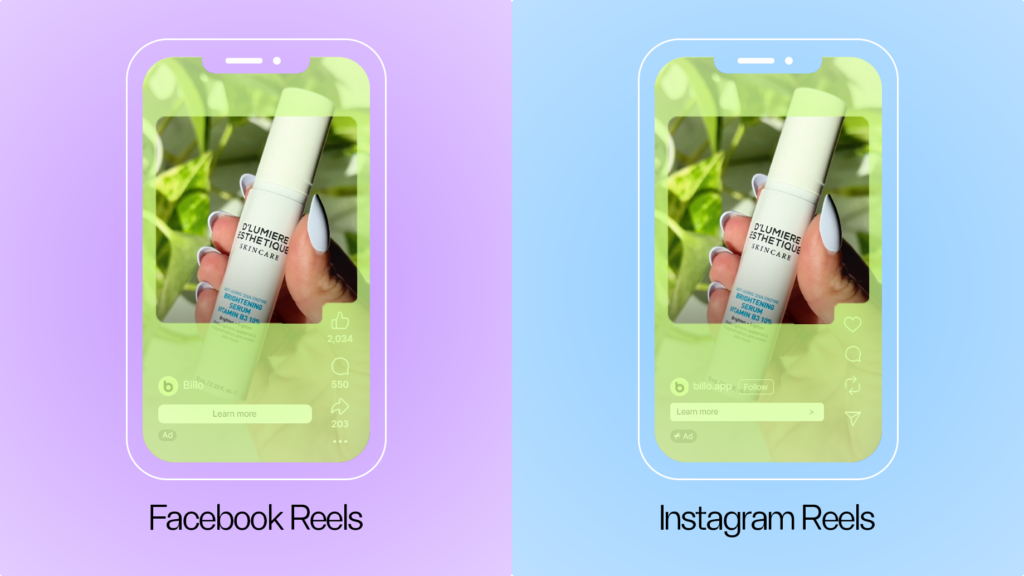
The unified rule comes down to specific pixel measurements. Keep all critical elements outside the top 14% (~358px), bottom 20%-35% (~512-896px) and sides 6% each (~87px) of the 1440×2560 canvas.
- The top margin accounts for the profile icon, username, and “Sponsored” label.
- The bottom margin covers CTA buttons, engagement icons, captions, and audio labels. The bottom range varies because Reels captions expand depending on caption length and device size, so conservative teams should treat the full 35% (896px) as the danger zone.
- The side margins account for height differences between various devices.
If you are designing creatives solely for Facebook and Instagram Stories, the safe zone is a little larger. You only have to worry about the top and bottom of the creative, the specs being the top 14% (~358px) and the bottom 14% (~358px) of the 1440×2560 canvas.

The Zoom vs. Letterbox Dilemma on Ultra-Tall Screens
The unified Meta ads safe zones cover the top, bottom and the sides of your canvas. The last variable being the one most advertisers overlook: what happens on the left and right edges when your ad renders on ultra-tall devices.
Many Samsung Galaxy and newer Android phones use a 20:9 aspect ratio, which is taller and narrower than the standard 9:16 (which equals 18:32). A standard 9:16 ad does not fill these screens natively, so Meta handles the mismatch with one of two automatic behaviors:
- “Smart Zoom” crops the left and right edges of your creative to fill the screen. (The new guidelines suggest this will be the default option)
- “Letterboxing” keeps the full creative intact but adds thin black bars at the top and bottom.
In practical terms, that means keeping all critical content, including text, logos, and CTAs, within the center ~80% of the horizontal canvas. Anything positioned near the left or right margins risks being partially or fully cut off on 20:9 devices.
When building or auditing 9:16 creative, do not design edge-to-edge. Pull your key elements toward the center both vertically and horizontally, and your ads will render cleanly regardless of which device or zoom behavior Meta selects.
The Death of 1:1: Feed Ratios Shift to 4:5 and 3:4
For the Instagram Feed ads, Meta also now officially recommends 4:5 (1440×1800) for single image ads and 9:16 (1080×1920) for video ads. Replacing the long-standing 1:1 default. A 4:5 image occupies approximately 31% more vertical screen space than a square in the mobile feed, increasing thumb-stop potential and dwell time.
Instagram updated its profile grid in 2025 to support 3:4 previews for single images and carousels, replacing the legacy square crop. Ads and organic posts now display taller in grid view, so a 4:5 ad appearing in a user’s profile “Posts” tab will show more of the image instead of being center-cropped.
For teams running Advantage+ or broad placement campaigns, the “1080×1080 center-square method” is worth adopting. Place all critical elements (headline, logo, CTA) within a centered 1080×1080 square on a 1080×1920 canvas, and the core message survives cropping across Feed, Stories, and Reels without separate asset versions.
The Performance Data Behind the Shift
These format changes are backed by measurable performance lifts from Meta’s own research.
On the image ads, 4:5 delivers approximately 1% higher CTR. That sounds modest, but at scale across five- and six-figure monthly budgets, fractional CTR improvements compound into meaningful ROAS gains.
For the video ads creative, 9:16 generates a 7% higher CTR making. Moreover, over 60% of time spent on Meta is now video-based, and 50% of Instagram time goes specifically to Reels. Meta is optimizing ad infrastructure around vertical video because that is where attention lives, and advertisers who align their creative are being rewarded with better delivery and lower costs.

Creative Checklist: How to Check Meta Ads Safe Zones During Setup
The fastest way to verify your creative meets the new safe zone requirements is inside Ads Manager itself, during ad setup. Before you hit publish, walk through these steps to confirm your creative is compliant across all placements.
- Scroll down to the ‘Ad Creative’ section
- Click ‘Edit Group’
- Use the placement previews to inspect each placement separately (Cycle through Stories, Reels, and Feed previews individually using the placement dropdown.)
- Validate that critical content stays inside the safe zone in every preview
This check takes under two minutes per ad and prevents wasted spend on creative where your CTA or key message gets covered by platform UI.
Summary and Next Steps
Meta’s March 2026 updates consolidate safe zones, push vertical-first creative, and reward taller aspect ratios with measurable performance lifts. Advertisers who do not update their templates risk UI obstruction, wasted spend, and lower ROAS.
Here is what to do now:
Immediate actions:
- Audit all active 9:16 creative against the 14% top / 20-35% bottom safe zone rule.
- Convert remaining 1:1 feed assets to 4:5 (1080×1350).
- Enable the Ads Manager Safe Zone Guardrail for every new campaign.
- Preview every ad across Stories, Reels, and Feed placements before publishing.
Longer-term:
- Adopt the center-square production method (critical elements within a centered 1080×1080 zone on a 1080×1920 canvas) for Advantage+ and broad-placement campaigns.
- Update all Figma or Sketch templates to include safe zone guide layers that match the current specs.
- Export at 1440×2560 for high-density screens to avoid upscaling artifacts.
The brands and agencies that update their templates now will benefit from better delivery, lower CPAs, and stronger ROAS as Meta continues to optimize its ad infrastructure around vertical video. The ones that wait will keep losing impressions to UI overlays and edge cropping.
FAQs
What are the exact safe zone pixel margins for Meta Reels and Stories ads?
Does the 4:5 ratio apply to carousel ads too?
What happens if my 9:16 ad is viewed on an ultra-tall (20:9) device?
Is 1:1 still supported in Meta ads?

SEO Lead
Passionate content and search marketer aiming to bring great products front and center. When not hunched over my keyboard, you will find me in a city running a race, cycling or simply enjoying my life with a book in hand.
Make creator marketing a data-backed growth channel

Related from Creative Insider
YouTube Shorts monetization just changed: 2027 payout overhaul for creators & brands

A food delivery app told me a human saw my order. Ads are next.

What happens to real UGC & AI UGC when AI labels are mandatory?